
CineFX AI Review: Cloud-Based Tool for Cinematic VFX Videos
Some of the links on this page may be affiliate links. If you decide to purchase, we may earn a commission at no extra cost to you.
What if you could build a full cinematic sequence without touching a timeline or juggling plugins? It’s the kind of idea that sounds far-fetched if you’ve ever spent hours cutting clips or trying to match lighting between shots. Yet tools built on newer AI models are beginning to make that level of automation feel less like a stretch and more like a practical option for everyday creators.
CineFX AI fits into this as one of the newest platforms focused on cinematic 3D visuals. It offers a way to produce high-end video effects without relying on complex software or technical know-how. For marketers and content creators, it promises a chance to turn ideas into cinematic ads, reels, and short-form videos in minutes.
What Is CineFX AI?
CineFX AI is a cloud-based application that uses artificial intelligence to generate 3D cinematic videos. It’s powered by Google’s VEO 3.1 engine, a technology designed to replicate the realism and depth of studio-level visual effects. The app runs entirely online, so there’s no need for high-end hardware or software installation.
Its workflow centers on automation. Users input basic information about their product or campaign, and the system produces scripts, voiceovers, visuals, and sound design automatically. The goal is to make professional video creation accessible to anyone, from solo creators to full-scale marketing teams.
CineFX AI positions itself as a bridge between traditional production and AI-assisted creativity, focusing on speed, simplicity, and cinematic quality.
Key Features and Capabilities
CineFX AI combines a wide range of tools that handle every step of cinematic video creation, from concept to final render. Each feature is built to remove technical barriers and keep the creative process fast and accessible.
AI-Powered 3D Cinematic VFX Creation
The platform’s foundation lies in its AI-driven VFX engine, powered by Google’s VEO 3.1 technology. It generates ultra-realistic 3D visuals in resolutions up to 8K, complete with natural lighting, smooth motion graphics, and dynamic camera movement. Users can produce results that resemble studio-quality visuals without needing manual edits or complex layering.
Cloud Rendering
Rendering takes place entirely on secure cloud servers. This means users can export 4K and 8K videos quickly without relying on high-end hardware. The cloud system also reduces lag, eliminates crashes, and frees up local storage, which is often a concern in video production.
Automated Workflow
CineFX AI automates nearly every production element. Scripts, voiceovers, transitions, and music are all generated from simple inputs such as text, URLs, or voice commands. The system analyzes pacing, tone, and emotion to match visuals with the right audio and camera flow, helping each video feel cohesive and cinematic.
Built-in AI Script and Video Creator
A dedicated script generator writes ad copy tailored for engagement and conversions. Once a script is produced, the same system creates the corresponding visuals, transitions, and voiceovers, forming a complete video package ready for review.
One-Click Poster and Thumbnail Designer
The app extends beyond video creation with tools for promotional design. Users can generate posters and thumbnails optimized for clicks on YouTube or social platforms, keeping branding consistent across campaigns.
Multi-Language and Voice Support
CineFX AI includes more than 150 AI voices and avatars across many languages and accents. This makes it easy to localize videos for global audiences without external dubbing or translation tools.
Real-Time Performance Tracking
Built-in analytics display live data on key metrics such as views, clicks, conversions, and revenue. These insights help creators and marketers refine their approach based on measurable results.
Commercial License and Advanced Tools
All customers receive a commercial license, allowing them to produce and sell videos without extra fees. Other creative tools are provided that add flexibility for professional production. These include AI face swap, lip-sync matching, chroma key effects, and the ability to animate still images. An advanced timeline editor and unlimited project capacity round out the platform’s capabilities.
How CineFX AI Works
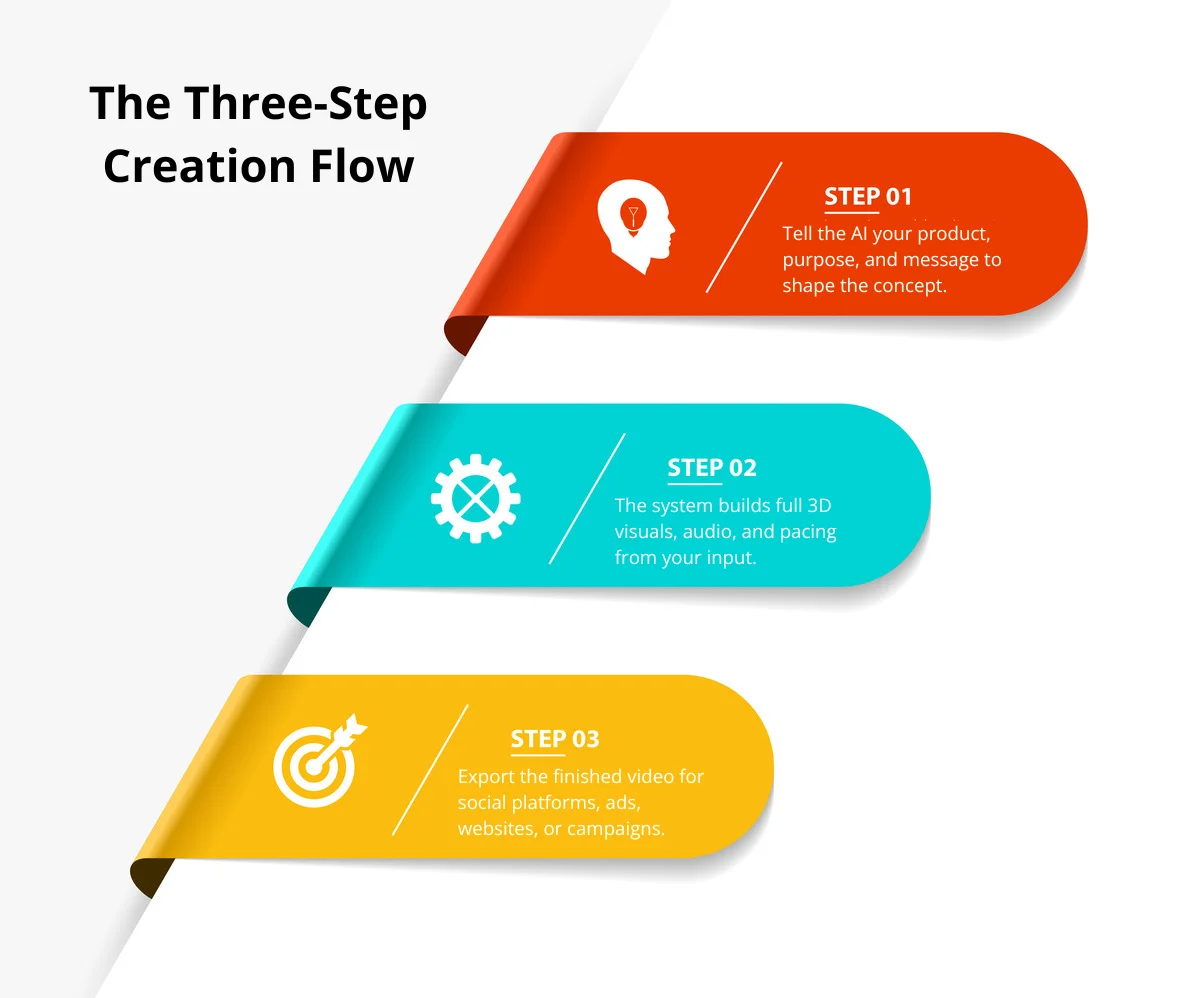
CineFX AI simplifies the entire video creation process into three steps. The system takes user input, builds a complete cinematic video through artificial intelligence, and prepares it for instant publishing. Each stage is designed to remove the need for editing skills or production experience.
Step 1: Enter Product Details
Users begin by entering basic information about their product, brand, or campaign. The platform asks for a short description and the main message to convey. Its AI engine interprets this input to understand tone, audience, and visual direction. From there, it creates a complete video concept, including script ideas and stylistic choices, without requiring manual scripting or copywriting.
Step 2: AI Generation
Once the details are submitted, CineFX AI’s core engine takes over. It produces the full cinematic sequence with 3D animations, realistic lighting, dynamic camera angles, and synchronized sound design. The system integrates music, voiceovers, captions, and visual transitions automatically, using Google’s VEO 3.1 technology to optimize structure and pacing. The result is a polished, 8K-quality video built entirely through automation.
Step 3: Publish and Share
The finished video can be published directly to YouTube, Instagram, TikTok, Facebook, or embedded on a website. Each format is pre-optimized for mobile and social platforms, reducing the need for resizing or re-editing. Marketers can deploy their content immediately, turning an idea into a ready-to-run ad or social post within minutes.
In practice, CineFX AI transforms a few lines of input into a full cinematic production, making high-end video creation accessible to anyone with a browser and an internet connection.
Who Should Use CineFX AI
CineFX AI is versatile enough for solo creators, marketing teams, and agencies alike. Its automation levels the playing field, allowing anyone to produce cinematic 3D videos that look studio-made without deep technical experience.

The platform suits a range of users, including:
- Digital marketers who need fast, high-quality ads and social media videos that grab attention and drive conversions.
- Content creators and influencers who want to elevate their Shorts, Reels, and TikToks with cinematic visuals that stand out in crowded feeds.
- Freelancers and small agencies aiming to deliver professional VFX videos to clients while saving time on manual production.
- Brands and eCommerce teams looking to maintain consistent, high-quality visuals and easily localize campaigns for different markets.
For anyone who values cinematic quality, efficient workflows, and creative flexibility, CineFX AI offers a practical way to create professional content without the usual production hurdles.
Performance and Output Quality
CineFX AI focuses on delivering high-end visuals and sound through a fully automated process. Its cloud rendering system and AI-driven engine combine to produce cinematic videos that hold up well in both technical quality and creative consistency.
Realism, Animation, and Audio Sync
The platform’s AI models generate lifelike 3D scenes with detailed textures, realistic lighting, and fluid camera motion. Visuals render in up to 8K quality, and movement across scenes feels natural rather than machine-generated. Audio performance matches that standard. Voiceovers in more than 100 languages stay tightly synchronized with visuals, and sound effects blend smoothly into transitions, giving each video a professional finish.
Rendering Speed and File Handling
Cloud rendering enables CineFX AI to process even complex animations quickly. Users don’t need high-end hardware or large local storage, since all rendering happens on secure remote servers. The system exports in both 4K and 8K formats with minimal waiting time, and files are optimized to balance visual quality with manageable sizes. Crashes and lag, common in traditional editing environments, are virtually eliminated.
Consistency Across Projects
One of CineFX AI’s strengths is its ability to maintain a consistent standard across various project types. Whether producing ads, cinematic trailers, or product videos, the platform applies the same level of polish through automated music syncing, transitions, and scene pacing. Built-in templates and one-click automation help ensure reliable results regardless of style or scope, making it well suited for users managing multiple campaigns or clients.
Usage Limits and Upgrade Options
CineFX AI sets a few limits on the base plan, so people who produce content often will want to understand how these caps affect their workflow. The monthly allowance reaches 50 videos, which can run out fast for daily publishers or anyone testing multiple ad variations.
Base Plan Limits
- Up to 50 video creations per month
- Watermark included
- Limited script generations
- 4K exports
- Best for those making a few short videos per week
The platform offers an upgrade called the Unlimited Edition. This option removes the biggest restrictions and gives you more room to produce longer videos without tracking monthly usage.
Unlimited Edition (OTO 1)
- No monthly video cap
- Watermark removed
- Longer videos, generally five to ten minutes
- More script generations and render capacity
- Access to higher resolutions, including 8K on upper tiers
- Designed for creators, agencies, and teams producing high volumes of content
These upgrades matter for anyone who posts often, handles client work, or runs active marketing campaigns. Those who produce fewer than ten videos per week may find the base plan enough. Heavier creators will likely need the Unlimited Edition to keep production moving without interruption.
Pros and Cons
Pros
- High-quality visuals: Produces cinematic 3D videos with realistic lighting, depth, and motion that rival professional studio results.
- Fast cloud rendering: Handles complex scenes quickly through cloud processing, removing the need for powerful hardware.
- Easy to use: Requires no VFX or editing experience, making it accessible to beginners and efficient for professionals.
- Full automation: Generates scripts, voiceovers, animations, and sound design from simple text input or voice commands.
- Multi-language support: Includes over 150 AI voices and avatars, allowing for global reach and localized content.
- Instant publishing: Exports videos directly to platforms like YouTube, TikTok, and Instagram without extra formatting.
- Commercial license included: Users can monetize their videos without paying additional fees.
- Consistent output: Maintains visual and audio quality across different types of projects.
Cons
- Limited creative control: Automated workflows may restrict detailed customization for advanced users.
- Requires stable internet: Cloud rendering depends on a reliable connection for smooth performance.
- Less suited for complex storytelling: Works best for short ads and promos rather than long-form narrative videos.
Final Verdict
CineFX AI shows how cinematic video production can be accessible without a studio or complex software. It handles every stage of creation, from 3D visuals to audio and motion, generating polished results that would normally require a full team.
For marketers, content creators, and small businesses, it offers a clear advantage: professional-quality videos produced quickly, without the cost or learning curve of traditional tools. Its mix of creative control and automation makes it a good option for anyone who needs impactful visuals that engage audiences across platforms.
Frequently Asked Questions
Yes. The interface is simple enough for newcomers, and most workflows follow clear prompts. People who have never edited video before can still produce polished results.
Most short videos render in a few minutes, but longer or higher-resolution projects take more time. The speed also depends on how busy the servers are during peak periods.
It offers templates, AI scenes, and multiple visual styles, to create ads, social clips, explainers, and cinematic videos without starting from scratch.
CineFX AI allows commercial rights, so you can create videos for clients or business use.
Yes. You can upload your own clips, images, and audio, then combine them with AI-generated scenes to build a custom project.